Babylist Baby Registry
- 4.8
- Rating
- 1.00M
- Installs
- Free
- Price

 Analysis by App-foxy
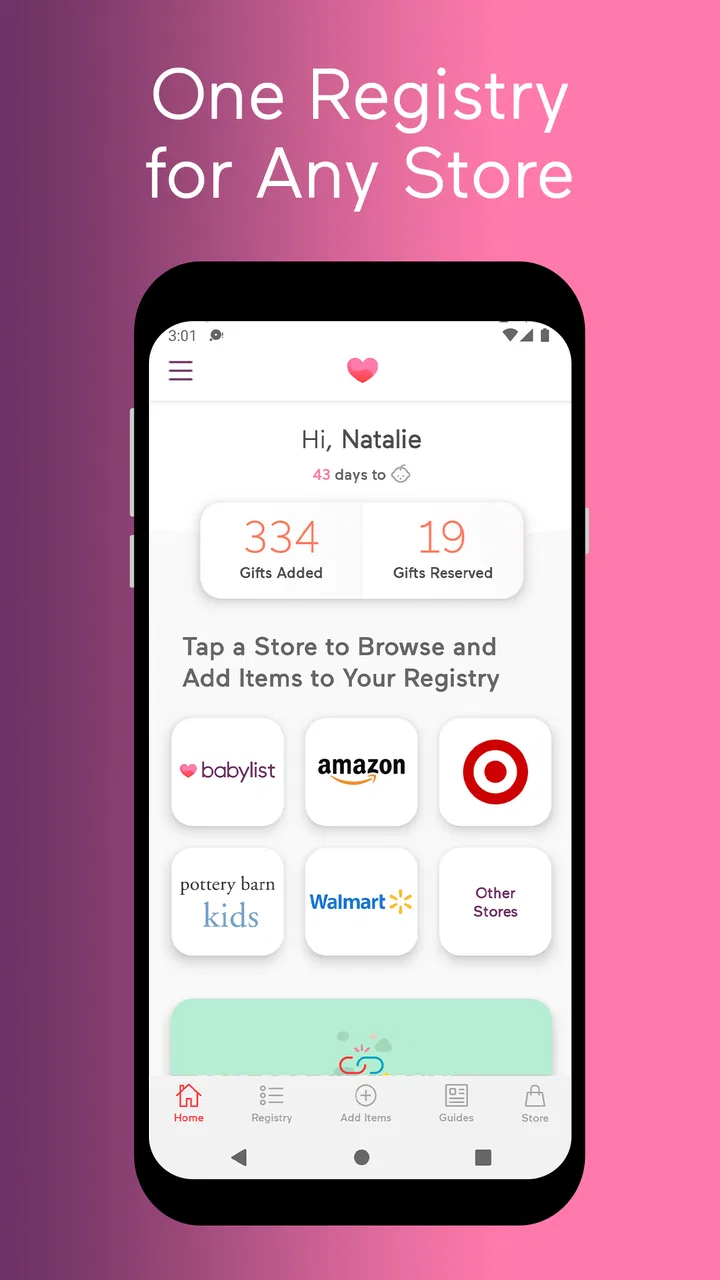
Choosing baby items can become surprisingly complicated once recommendations start arriving from different shops, marketplaces, and local stores. Babylist Baby Registry takes a focused approach to that problem: it lets me gather items from different retailers into one registry instead of forcing every gift choice into a single store. That idea sounds simple, but it changes how I plan a registry, especially when one shop has the stroller I want, another has better bottle options, and a third carries a small item that is difficult to find elsewhere.
I reviewed it as a free lifestyle app from Babylist Inc, and my overall impression is that its value comes less from flashy extras and more from reducing the number of places everyone has to check. The app is rated 4.8 from around 18 thousand ratings, has passed 1 million installs, and is suitable for Everyone. Those figures suggest that the concept has connected with a large audience, but the more important question is whether a multi-store registry actually makes everyday planning easier. For me, it does, provided I am willing to keep the list organized and pay attention to where each item comes from.
One registry for choices that normally live in several stores
The central capability is the option to put items from any store on one baby registry. In practical terms, the registry becomes a planning layer rather than a shopping basket belonging to one retailer. I can think about what the baby and parents need first, then choose the store that makes sense for each product instead of changing the product choice simply because a preferred retailer does not carry it.
You May Also Like

 Blood Strike: 2.5 Anniversary
Blood Strike’s Loadouts Turn Every Drop Into a Tactical Gamble
A close look at Blood Strike’s custom loadouts: how fast access to signature weapons reshapes its battle royale rhythm, rewards preparation, and narrows the gap between fights.

 Pandora - Music & Podcasts
Pandora’s Music Is Easy to Start, but Harder to Recover
Pandora’s strength is its low-effort path from a seed to a station. Its weak spot is how much confidence it asks you to place in connection, setup, and quiet recovery.

 8 Ball Pool
 Is Built on Rivalries, Rematches, and Routine
A close look at the rivalries, rematches, shared routines, and unanswered safety questions that turn a quick pool match into a persistent mobile community.

 Samsung Music
’s Quiet Strength Is Playing What You Already Own
Its reach comes less from spectacle than from dependable access to a personal library. That simplicity is both the app’s strongest retention engine and its ceiling.

 AccuWeather: Weather Radar
AccuWeather Review: A Quick, Clear Forecast for Everyday Decisions
For everyday plans, the best forecast is the one you can understand quickly. AccuWeather makes rain timing, radar, and local conditions easy to act on, with a few trade-offs.

 Hill Climb Racing
Why Hill Climb Racing Still Turns Crashes Into One More Run
A tiny car, a bumpy hill and one more upgrade: Hill Climb Racing keeps resurfacing because its simple chaos makes every near-miss feel personal.
More From Our News Desk



That distinction matters for baby equipment. A family may want a particular brand of car seat, a specific style of crib sheet, a locally made blanket, and a certain feeding accessory. Those products rarely sit neatly in one catalog. A conventional single-store registry is convenient when everything is available there, but it can also create compromises. I may settle for a less suitable version, create several separate lists, or send relatives searching through messages and screenshots.
Babylist brings those choices together. The result is not just a longer wish list; it is a shared reference point for people who want to buy something useful without asking me repeatedly where it can be found. The real strength is retailer flexibility, not simply list-making. That makes the app especially relevant for parents who have already researched products and do not want the registry to dictate the final selection.
I also like the way this capability separates discovery from organization. I can encounter an item while browsing a retailer, decide that it belongs on the registry, and keep it beside products found elsewhere. That is more natural than trying to remember which store contains each item. It also helps when relatives have different shopping habits: one person may prefer a familiar online retailer, while another may be comfortable buying from a specialist shop.
How the multi-store idea works in practice
In use, I would begin by treating the registry as a central checklist rather than a finished shopping cart. I would add the major categories first, then fill in smaller needs as I think of them. The important habit is to record the actual item I would be happy to receive, not a vague category such as “bottles” or “baby clothes.” A precise product choice reduces the chance that a guest buys something unsuitable simply because the list leaves too much interpretation.
The app’s cross-store approach is most useful when I already know why an item belongs on the list. For example, I might choose one retailer for a large nursery purchase and another for a particular accessory. Instead of maintaining two separate registries, I can keep both choices in the same place. That makes the list easier to share and gives me one location to review before sending it to family and friends.
There is a small but important organizational trade-off here. A unified registry does not automatically remove the differences between retailers. Each item still belongs to its original shopping environment, so I need to read the listing carefully and remember that availability, delivery arrangements, returns, and final checkout may vary by store. The app simplifies the registry itself; it does not turn every retailer into one identical service.
That is why I would use a short review routine after adding several items. I would check whether the product description still matches what I want, whether I have accidentally added near-duplicates, and whether the list contains a useful mix of essentials and optional choices. This is one of the less obvious benefits of the app: it encourages me to think about the registry as a communication tool for guests, not merely as private shopping research.
Another practical point is that a multi-store registry can expose a weakness in my own planning. When everything is in one retailer’s catalog, it is easy to assume that a full-looking cart is a complete preparation plan. Bringing items from different sources together makes gaps easier to notice. I can see whether I have focused too heavily on attractive extras while overlooking everyday basics, or whether several entries serve the same purpose.
A realistic everyday registry scenario
Imagine that I am preparing for a baby while working through a long list of recommendations from relatives, parenting groups, and my own research. I find a sleep item at one store, feeding supplies at another, and a changing accessory somewhere else. Without a central registry, I might save browser tabs, send product names through a family chat, and later forget which version I actually preferred.
With Babylist, I can place those choices together and share one destination. A relative who wants to buy a gift can browse the list instead of asking me to confirm every product. If another family member has already chosen one item, the registry gives everyone a better chance of seeing the current state of the list before buying. Even when the final purchase still happens through the original retailer, the planning conversation is less scattered.
The advantage becomes clearer when the registry includes products with very different levels of importance. I might mark a nursery essential alongside a convenient but non-urgent accessory. That gives guests room to choose according to their budget and interest without requiring me to create separate lists for “must have” and “nice to have.” I would still label or organize the list thoughtfully, because a mixed registry can otherwise feel overwhelming.
For a family spread across different locations, this centralization can also reduce friction. People do not need to know which store I used for each item before they start browsing. They can begin with the registry and decide what suits them. That is a modest improvement, but during pregnancy and early parenthood, removing repeated explanations is genuinely useful.
Where the capability has limits
The same flexibility that makes the app attractive can make the registry require more supervision. A single-store registry usually offers a consistent shopping path. A multi-store registry is more like a map connecting several paths. I gain freedom, but I also take on the responsibility of checking each destination and keeping my choices current.
This matters most for products where details are easy to confuse. Baby gear can have similar names, several sizes, or versions designed for different stages. If I add an item quickly without reviewing its exact description, a guest may see the right general product but choose the wrong variation. My advice is to add clear notes where a size, color, model, or compatibility detail matters, and to revisit important entries before sharing the registry widely.
There is also a difference between discovering an item in one place and completing the purchase. The registry can gather the choices, but the eventual checkout experience remains connected to the retailer. That means I should not assume that every item has identical shipping speed, stock status, gift options, or return process. For expensive or time-sensitive purchases, I would ask the buyer to verify the details at checkout rather than treating the registry entry as the final word.
Another trade-off is that choice can become clutter. When I can add items from many stores, I may be tempted to include every version I like. That may help me compare products privately, but it is not always helpful for guests. A registry works best when it communicates decisions, not when it becomes an archive of undecided research. I would keep alternatives limited and remove items that no longer reflect my preference.
This is also where a traditional single-retailer registry may be better. If convenience, uniform delivery, and one return process matter more to me than product variety, a single-store option could feel calmer. It may be easier for guests who want a familiar checkout and for parents who want fewer retailer accounts or order histories to manage. Babylist is strongest when the freedom to combine stores outweighs that extra coordination.
Useful ways to build a better registry
My first tip is to add the items that solve real daily problems before adding decorative products. A registry assembled around routines is easier to use than one assembled around browsing. Think through feeding, changing, sleeping, travel, clothing, and recovery, then add products that fit the way the household expects to operate. The multi-store feature is most valuable when it helps me choose the right item for each routine rather than simply collect more options.
My second tip is to use the registry as a conversation filter. If an item has a detail that guests might misunderstand, I would make that detail obvious in the item selection or accompanying note. This is especially useful for products where the wrong size or format would make the gift less useful. A few minutes of clarification can prevent an awkward exchange later.
My third tip is to separate personal research from the guest-facing list. I may want to compare several products while deciding, but guests generally need a clean set of choices. I would narrow down duplicates and keep only the versions I genuinely recommend. This makes the app feel less like a cluttered bookmark folder and more like a practical registry.
A fourth insight is to plan around the buyer, not only around the product. If a relative prefers shopping in a particular place, the ability to include items from multiple retailers may make the registry more approachable. However, I would still avoid assuming that every guest wants to navigate a complicated list. Clear categories and a manageable number of choices matter as much as the range of stores.
Finally, I would review the registry at meaningful planning points rather than constantly editing it. Excessive changes can make it difficult for family members to know what is still wanted. A periodic cleanup is more useful: remove items that no longer fit, confirm the important selections, and make sure the list reflects current priorities.
Who will get the most from Babylist?
I think the app is a particularly good fit for first-time parents who have already discovered that no single retailer carries everything they want. It also suits families with specific brand preferences, people who want to include independent or specialist shops, and parents whose relatives shop through different channels. In these cases, the central registry can save repeated explanations and reduce the need to maintain several lists.
It can also help parents who are still refining their choices. A registry that accepts products from different stores gives room to make decisions based on suitability rather than retailer loyalty. That is useful when one item is chosen for its design, another for its availability, and another because it is the only option that fits a particular need.
I would be more cautious if I wanted a completely uniform purchasing experience. Someone who prefers one retailer, one delivery system, and one return policy may find the app’s flexibility less important. Likewise, a person who dislikes maintaining lists may need to invest more effort in cleaning up entries and checking retailer-specific details.
The app is free, which removes an obvious barrier to trying the approach. It runs on Android starting with version 7.0, and its current version is 3.75.0. It has also been available since April 16, 2014, giving it a long presence in the baby-planning space. Those details do not replace hands-on judgment, but they make it a practical option for someone looking for an established registry app rather than a temporary shopping list.
My final view is that Babylist Baby Registry succeeds because it solves a specific organizational problem well. It does not make every retailer identical, and it cannot replace careful checking of product details or purchase conditions. What it does is give me one place to express choices that would otherwise be scattered across several stores. If that flexibility matches the way I shop, it is a thoughtful and genuinely useful addition to preparing for a baby. If I value simplicity above variety, a single-store registry may still be the better fit.
FAQs for Babylist Baby Registry
01What is Babylist Baby Registry and how does it work?
Babylist Baby Registry is a comprehensive app that allows parents-to-be to create a personalized baby registry. Unlike traditional registries, Babylist lets you add items from any store, including non-traditional gifts like home-cooked meals or babysitting services. It centralizes all your baby needs in one place, making it easy to manage and share with friends and family.
02Is Babylist Baby Registry free to use?
Yes, the Babylist Baby Registry app is free to download and use. There are no charges for creating a registry or for adding items to your list. However, when purchasing items, you'll be subject to the prices and shipping costs of the individual retailers. The app does not add any additional fees.
03Can I add items from any store to my Babylist registry?
Absolutely! One of the standout features of Babylist is its flexibility. You can add items from any online store, not just a single retailer. This allows you to choose the best products at the best prices, ensuring you get everything you need for your baby, from a variety of sources.
04How do I share my Babylist registry with friends and family?
Sharing your Babylist registry is simple. Once you've created your list, the app provides various sharing options, including email, social media, and direct links. This makes it easy for your friends and family to view your registry and purchase items directly from your list, ensuring you receive exactly what you need.
05Does Babylist offer any additional services beyond the registry?
Yes, Babylist offers several additional services to support new parents. These include expert guides, articles on baby care, and product reviews. They also offer a cash fund feature where friends and family can contribute to larger items, like strollers or nursery furniture, or even services like babysitting or meal delivery.
Pros
- User-friendly interface for easy navigation.
- Seamlessly integrates with multiple retailers.
- Offers gift tracker and thank-you notes.
- Universal registry for any item
- anywhere.
- Price comparison tool saves money.
Cons
- Limited customization for registry themes.
- Some items may have shipping restrictions.
- Occasional sync issues with retailers.
- Customer support response can be slow.
- App size may be large for some devices.

Babylist Baby Registry
Gallery